
借助 LiteRT Tensor API 在边缘设备上原生构建模型
原题Native Model Authoring for Edge with LiteRT Tensor API
读前速览
Google 推出 LiteRT Tensor API,这是一个原生 C++ 层,可支持跨平台、零拷贝的设备端 AI 模型开发,并兼容 AI 编程智能体。
LiteRT Tensor API 让开发者能够全面控制模型计算图结构,同时保持跨平台可移植性。
通过用 C++ 编写每个算子,并让同一份代码运行于 CPU、GPU、NPU 或 XNNPACK,开发者无需针对新硬件平台重写代码。
该 API 以张量为中心的缓冲区互操作方式让数据留在加速器上,避免了代价高昂的 CPU 拷贝。
预处理、推理和后处理共享加速器缓冲区,因此整个流程只增加约 0.34 ms 的开销。
该 API 专为作为 AI 编程智能体的程序化基础而设计。
智能体可以自动生成、重连并调优模型计算图;一个编程智能体已展示了如何针对 WebGPU 优化 SAM 2。
实际基准测试显示,macOS 上的速度提升了 1.5×,而 WebGPU 上也能达到较高的 FPS。
SAM 2 的同一份 C++ 代码可运行于 Metal、OpenCL 和 WebGPU,达到 >30 fps,并生成与 Meta 参考掩码相匹配的结果。
未来的扩展将使该 API 适用于更多设备和使用场景。
未来计划包括直接支持 ML Drift 后端、适配 NPU 的算子、自动量化和 Python 构建接口。
完整摘要
Google 最新推出的 LiteRT Tensor API 是一个轻量级模型构建层,开发者可以用原生 C++ 逐个算子构建神经网络计算图,同时让整个流程都在加速器上运行。该 API 可全面控制计算图结构,直接从 Hugging Face 的 .safetensors 文件载入权重,并通过以张量为中心的缓冲区互操作消除 CPU 往返传输。它无需模型文件即可运行于 CPU、GPU(通过 Metal、OpenCL 或 WebGPU)、NPU 或 XNNPACK,因而具有很强的可移植性。其一大亮点是可作为 AI 编程智能体的基础:智能体能够自动生成、重连并调优模型计算图。一个编程智能体就曾重写 SAM 2 分割模型,使其在 WebGPU 上达到 >30 fps。文章还展示了该 API 在 macOS、iOS 和 Android 上的跨平台性能,并介绍了未来计划,包括直接支持 ML Drift 后端、适配 NPU 的算子、自动量化和 Python 构建接口。
目录 · 10 节
在设备上部署 AI 意味着必须满足目标设备上的严格延迟和内存预算。生产环境中部署模型最常见的做法是转换已训练的模型,例如使用 LiteRT Torch 转换 PyTorch 模型,然后通过 LiteRT 运行时运行。这是进入生产环境最快、最可靠的途径,也是我们对大多数项目的推荐方案。不过,有时开发者希望完全掌控网络的表示和优化方式,以支持新的架构,或尝试新的降低逻辑,而无需等待上游框架更新。Shipping on-device AI means meeting tight latency and memory budgets on every device you target. The most common path for deploying models in production is converting a trained model, for example converting a PyTorch model with LiteRT Torch, and running it with the LiteRT runtime. This offers the quickest and most reliable route to production, and it's the path we recommend for most projects. Sometimes, though, developers want full control over how a network is represented and optimized to support new architectures or to try a new lowering logic without waiting for upstream framework updates.
为了实现极致控制,开发者会直接使用原生 C++ 或着色器语言手动编写计算代码。Apple 的 MLX 让这种以代码为先的方法在 Apple 芯片上广受欢迎,而 llama.cpp 则展示了针对性定制的 C++ 实现能将 LLM 推理性能提升到何种程度。然而,这种控制力也带来了高昂的代价:实现与特定后端(如 Metal、OpenCL 或 Vulkan)紧密耦合,且每更换一种硬件目标都必须重写代码。此外,要管理 CPU、GPU 和 NPU 之间的零拷贝缓冲区互操作与同步,并将预处理、推理和后处理串联起来,需要投入大量手动工程工作。For ultimate control, developers write computations manually in native C++ or shader languages. Apple's MLX made this code-first approach popular on Apple silicon, and llama.cpp showed how far tailored C++ implementations can take LLM inference. However, the level of control comes at a significant cost: implementations are tightly coupled to specific backends (such as Metal, OpenCL, or Vulkan) and must be rewritten for each new hardware target. Furthermore, managing zero-copy buffer interoperability and synchronization across CPU, GPU, and NPU, while gluing together pre-processing, inference, and post-processing, demands substantial manual engineering effort.
为应对上述挑战,我们很高兴地宣布推出全新的 LiteRT Tensor API。它是 LiteRT 技术栈中的轻量级编写层,旨在改进模型的手工构建。它兼具原生编写的灵活性与跨平台可移植性。你可以在 C++ 中逐个算子构建计算图,精确选择要运行的算子及其连接方式。同一张计算图可以通过 LiteRT 在 CPU、GPU(由开源项目 ML Drift 驱动)和 NPU 上运行,也可以无需模型文件或运行时,直接通过 XNNPACK 在 CPU 上运行,因此无需针对每种新硬件目标重新编写代码。模型推理以及预处理和后处理可以通过同一套 API 组装,并借助共享的加速器缓冲区串联起来,从而避免数据往返于 CPU。大多数模型仍建议优先采用转换流程。当你需要对计算图进行底层控制,或希望整个流水线端到端地在加速器上运行时,再使用 Tensor API。To solve the above challenges, we are excited to announce the release of the novel LiteRT Tensor API, a lightweight authoring layer in the LiteRT stack, designed to improve handcrafting models. It combines the flexibility of native authoring with cross-platform portability. You build the computation graph op by op in C++, choosing exactly which ops run and how they connect. The same graph can run through LiteRT on CPU, GPU (powered by open-source ML Drift) and NPU, or without model file or runtime directly on CPU through XNNPACK, so you don't rewrite it for each new hardware target. Model inference and pre/post-processing can be assembled with the same API and chained through shared accelerator buffers, so that data never round-trips through the CPU. Start with the conversion path, which remains the best default for most models. Reach for the Tensor API when you need low-level control over the graph or want the whole pipeline to run end to end on the accelerator.
LiteRT Tensor API 也是 AI 编码代理理想的程序化基础,提供了结构化的基本组件,可用于自动生成、重连和调优模型图。本文接下来将深入探讨其设计,并通过实际代码示例演示如何从零开始编写模型。The LiteRT Tensor API also serves as an ideal programmatic foundation for AI coding agents, providing structured primitives to generate, rewire, and tune model graphs automatically. In the rest of this post, we’ll dive into the design and walk through practical code examples showing how to author models from scratch.
Real-world showcase: Segment Anything on Web
抱歉,您的浏览器不支持播放此视频Sorry, your browser doesn't support playback for this video
为了展示 Tensor API 的实际应用,我们构建了一款交互式 Segment Anything 应用,可完全在设备端的浏览器中通过 WebGPU 运行。该应用借助 Meta 的 Segment Anything Model 2(SAM 2),支持实时多目标分割与追踪;用户只需简单点击,或输入由 Gemma 4 E2B 驱动的自然语言提示即可触发。To show the Tensor API in practice, we built an interactive Segment Anything App, running entirely on-device in the browser on WebGPU. The app enables real-time multi-object segmentation and tracking via Meta's Segment Anything Model 2 (SAM 2), triggered either by simple clicks or natural language prompts powered by Gemma 4 E2B.
SAM 2 模型完全通过 LiteRT Tensor API 使用 C++ 编写。一个编程代理编写并持续改进了该模型,使其在 WebGPU 上以 512×512 分辨率运行时,帧率从不到 10 帧提升至 30 多帧。完整实现和 Web 应用均已在 LiteRT Samples GitHub 仓库中开源。The SAM 2 model is fully authored in C++ via the LiteRT Tensor API. A coding agent wrote and evolved it from under 10 to over 30 frames per second at 512x512 on WebGPU. See that the complete implementation and the web app are open source in the LiteRT Samples GitHub repo.
What is the LiteRT Tensor API?
LiteRT Tensor API 提供四项关键功能,用于创建和优化设备端模型:The LiteRT Tensor API provides four key features for authoring and optimizing on-device models:
- 全面掌控计算图结构:你可以决定模型图中的每个算子及其相互连接方式,涵盖从逐元素数学运算到针对加速器优化的 LLM 复合算子,例如缩放点积注意力、RMSNorm 和 KV 缓存更新。Full control over graph structure: you decide every op in the model graph and every connection between them, from elementwise math to accelerator-optimized LLM composite ops, such as scaled dot-product attention, RMSNorm, and KV-cache updates.
- 直接加载权重:直接从模型检查点加载权重,例如 Hugging Face 的 .safetensors 文件,无需使用中间转换脚本。Direct weight ingestion: load weights straight from model checkpoints, such as Hugging Face .safetensors files, without conversion scripts needed in between.
- 以张量为中心的缓冲区互操作:预处理、模型分区和后处理通过共享的加速器缓冲区相互传递张量,使中间数据始终留在加速器上,实现零拷贝。Tensor-centric buffer interop: pre-processing, model partitions, and post-processing pass tensors to each other through shared accelerator buffers, so intermediate data stays on the accelerator with zero copies.
- AI 智能体的构建模块:模型由定义明确的算子以纯 C++ 编写,因此编程智能体可以构建模型、将结果与参考实现进行比对,并通过在各设备上对不同变体进行基准测试来优化性能。Building blocks for AI agents: models are plain C++ built from well-defined ops, so coding agents can construct a model, check its results against a reference, and tune its performance by benchmarking variants on each device.
跨平台性能Cross-platform performance
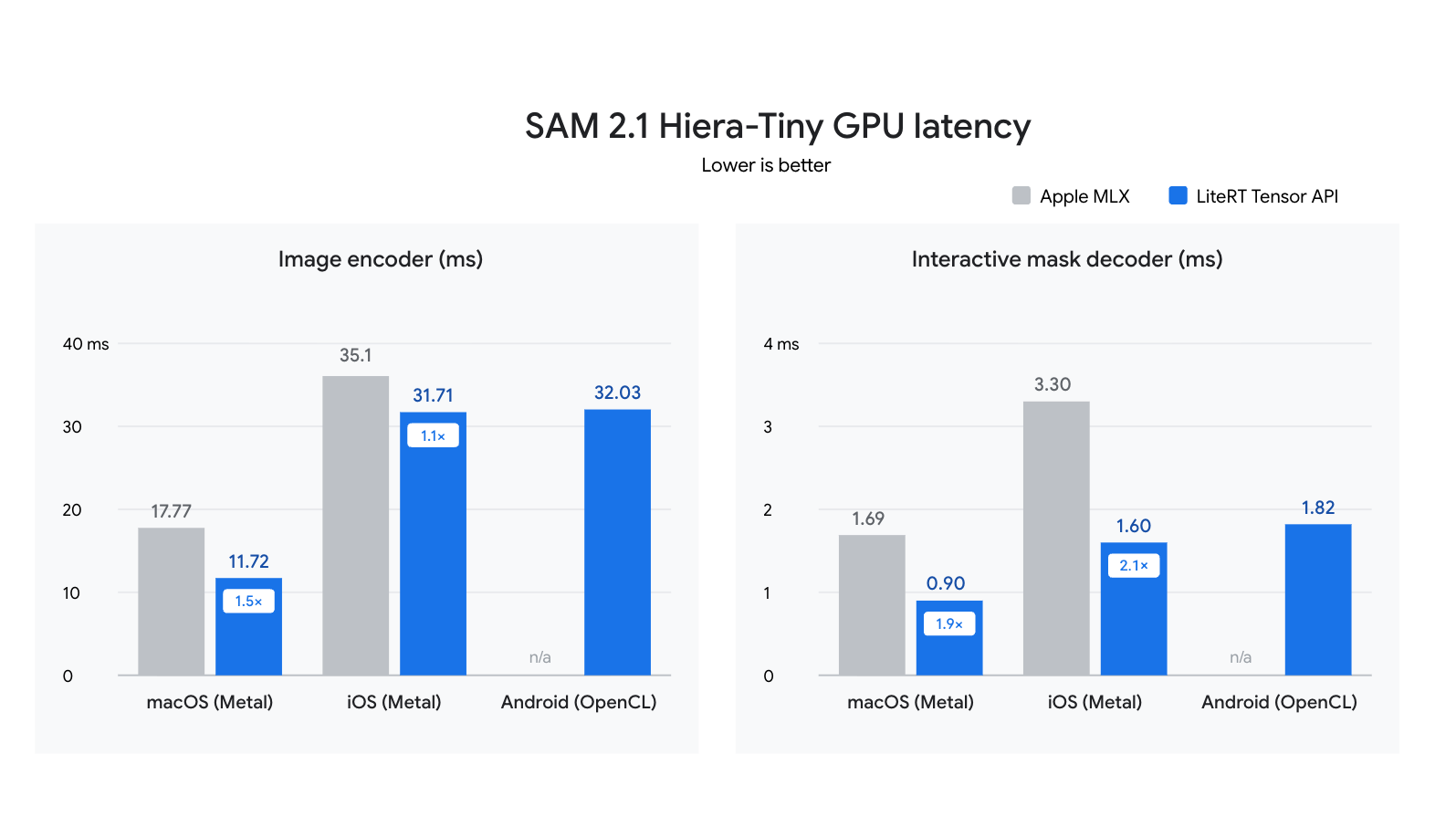
我们在三台设备的 GPU 上运行了相同的 SAM 2 模型 C++ 代码:一台 macOS 笔记本电脑(Metal)、一部 iOS 手机(Metal)和一部 Android 手机(OpenCL)。在 MacBook Pro 上的测试中,其运行速度约为 Apple MLX(fp16,图像编码器加掩码解码器)的 1.5 倍。SAM 2.1 示例中包含基准测试命令,你可以用它们复现测试结果。We ran the same C++ code for the SAM 2 model on the GPUs of three devices: a macOS laptop (Metal), an iOS phone (Metal), and an Android phone (OpenCL). In our tests on the MacBook Pro, it ran about 1.5x faster than Apple MLX (fp16, image encoder plus mask decoder). The SAM 2.1 sample includes the benchmark commands so you can reproduce the results.
开始使用 Tensor APIGet started with Tensor API
使用原生 C++ 编写创作模型Authoring model in native C++
使用 Tensor API 时,每一层都是一个针对 Tensor 值的 C++ 函数,由高级运算符和直接从检查点加载的权重构成。例如,下面是一个多头自注意力层:With the Tensor API, each layer is a C++ function over Tensor values, built from high-level operators and weights loaded directly from the checkpoint. For example, here is a multi-head self-attention layer:
// Multi-head self-attention over x: [batch, tokens, dim].
Tensor Attention(const Tensor& x, const WeightMap& w, int heads) {
  std::vector<int> s = x.GetShape();
  int b = s[0], n = s[1], dim = s[2], d = dim / heads;
  Tensor q = FullyConnected(x, w.at("q_proj.weight"), w.at("q_proj.bias"));
  Tensor k = FullyConnected(x, w.at("k_proj.weight"), w.at("k_proj.bias"));
  Tensor v = FullyConnected(x, w.at("v_proj.weight"), w.at("v_proj.bias"));
  // Split heads: [b, n, dim] -> [b, heads, n, d].
  q = Transpose(Reshape(q, {b, n, heads, d}), {0, 2, 1, 3});
  k = Transpose(Reshape(k, {b, n, heads, d}), {0, 2, 1, 3});
  v = Transpose(Reshape(v, {b, n, heads, d}), {0, 2, 1, 3});
  // softmax(q * k^T / sqrt(d)) * v, for all heads at once.
  Tensor scores = BatchMatMul(q, k, /*adj_x=*/false, /*adj_y=*/true);
  Tensor attn = Softmax(Mul(scores, 1.0f / std::sqrt(static_cast<float>(d))));
  Tensor out = BatchMatMul(attn, v);
  // Merge heads: [b, heads, n, d] -> [b, n, dim], then project.
  out = Reshape(Transpose(out, {0, 2, 1, 3}), {b, n, dim});
  return FullyConnected(out, w.at("out_proj.weight"), w.at("out_proj.bias"));
}在 SAM 2 示例中,BuildEncoder 和 BuildDecoder 会以这种方式将各层组合成编码器和解码器计算图,而 ModelFactory 会将两者作为同一个 sam2_image.tflite 文件中的两个签名导出。In the SAM 2 sample, BuildEncoder and BuildDecoder compose layers like this into the encoder and decoder graphs, and ModelFactory exports both as two signatures of one sam2_image.tflite file.
.tflite 文件是运行图的两种方式之一。后端是 Tensor 的模板参数:TfLiteMixinTag 会导出一个 .tflite 文件,由 LiteRT 在 CPU、ML Drift(GPU)或 NPU 上运行;XnnpackMixinTag 则通过 XNNPACK 在 CPU 上直接运行相同的代码,无需模型文件。为同时保留这两种选项,请为张量添加这两个标签:A .tflite file is one of two ways to run your graph. The backend is a template argument on Tensor: TfLiteMixinTag exports a .tflite that LiteRT runs on CPU, ML Drift (GPU), or NPU, and XnnpackMixinTag runs the same code directly on CPU through XNNPACK, with no model file. Tag tensors with both to keep both options:
// Tag tensors for both backends; ops record one graph either can run.
using T = Tensor<TfLiteMixinTag, XnnpackMixinTag>;
T y = Attention(x, w, /*heads=*/8);  // The layer above, over T values.
// Export a .tflite and run it with LiteRT on CPU, GPU, or NPU.
Save({y}, "attention.tflite");
// Or run the same graph directly on the CPU with XNNPACK.
auto runner = XnnpackRunner::Create({y});
runner->Run();SAM 2 通过 .tflite 路径在浏览器中使用 WebGPU,本文其余部分也将沿着这条路径展开。Gemma 4 示例则采用直接路径,在 CPU 上进行预填充和解码,这是运行 Tensor API 代码最轻量的方式。Tensor API README 对这两种方式都有介绍。SAM 2 takes the .tflite path to reach WebGPU in the browser, and the rest of this post follows it. The Gemma 4 example takes the direct path for prefill and decode on CPU, the lightest way to run Tensor API code. The Tensor API README walks through both.
一种自然的工作流是两者兼用:在直接使用 XNNPACK 的路径上迭代,直接从 .safetensors 检查点加载权重,无需重新构建模型文件;准备好通过 LiteRT 在移动设备上部署,或通过 LiteRT.js 在 Web 上部署时,再导出 .tflite 文件。A natural workflow uses both: iterate on the direct XNNPACK path, loading weights straight from the .safetensors checkpoint with no model file to rebuild, then export a .tflite when you're ready to ship with LiteRT on mobile or on the web through LiteRT.js.
表示完整的机器学习计算图Expressing the full ML computation graph
一个真正的应用需要的不只是神经网络本身。在演示中,将摄像头画面和一次点击转换为掩码需要四个步骤:预处理将画面转换为模型所需的 512x512 图像;图像编码器将图像转换为特征;掩码解码器将这些特征与点击信息结合起来,预测掩码;后处理则将掩码缩放回画面的尺寸。要快速运行整个流程,需要做到两点:在各步骤之间将数据保留在加速器(例如 GPU)上,并控制每个步骤在各个加速器上的运行方式。A real app needs more than the neural network itself. In the demo, turning a camera frame and a click into a mask takes four steps: pre-processing converts the frame into the 512x512 image the model expects; the image encoder turns that image into features; the mask decoder combines those features with the click to predict a mask; and post-processing scales the mask back to the frame's size. Running this whole pipeline fast takes two things: keeping data on the accelerator (such as the GPU) between steps, and controlling how each step runs on each accelerator.
零拷贝:让整个流水线都在加速器上运行Zero copies: Keep the whole pipeline on the accelerator
在典型应用中,只有模型运行在 GPU 上;CPU 会调整每一帧摄像头画面的大小,将编码器的输出传给解码器,并对掩码进行后处理。每次数据往返都会复制数据,并使 GPU 停顿。In a typical app, only the model runs on the GPU; the CPU resizes each camera frame, passes the encoder's output to the decoder, and post-processes the mask. Each trip copies data and stalls the GPU.
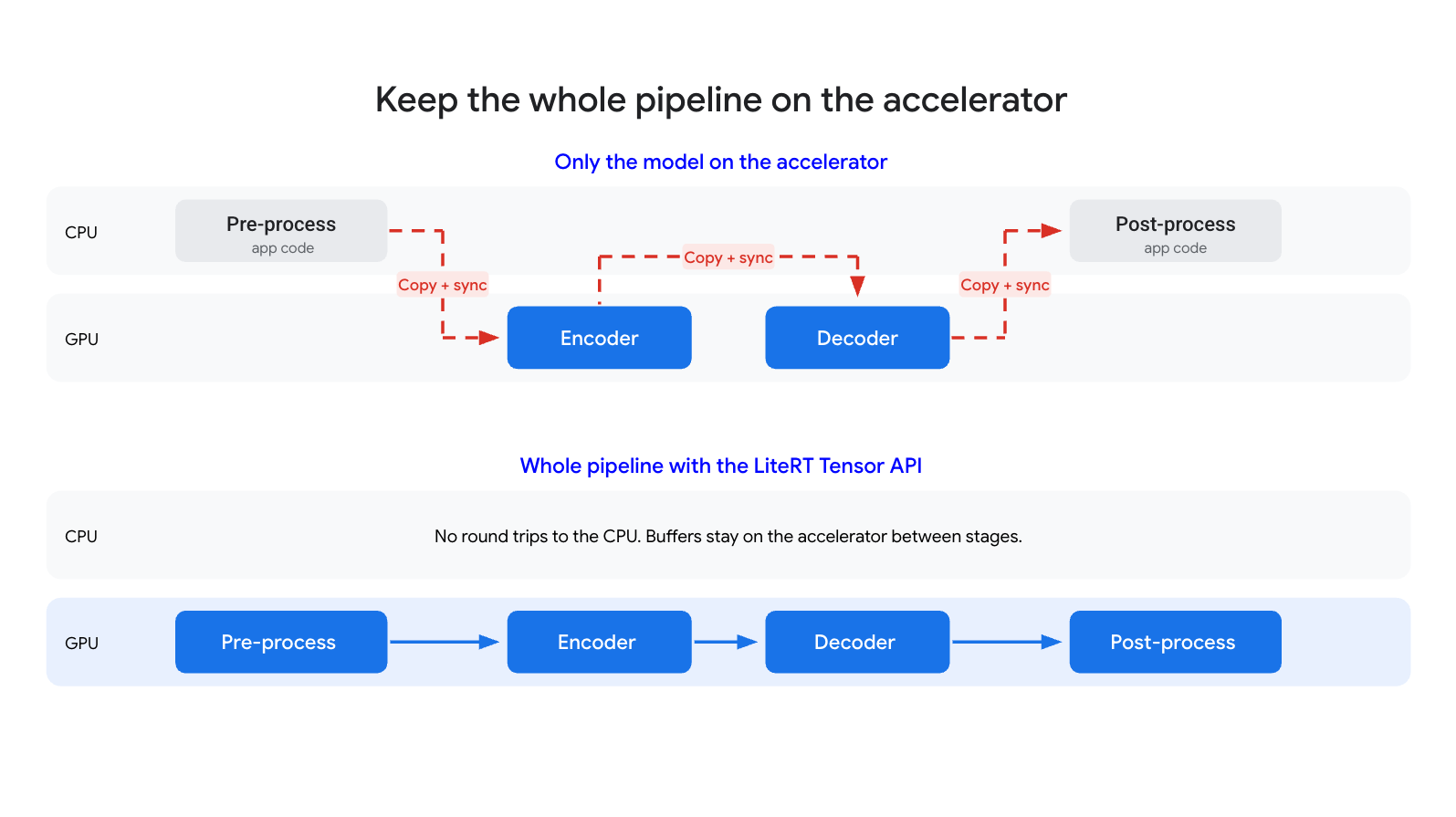
在 litert-samples/sam2 中,全部四个步骤都是 GPU 上的 Tensor API 计算图。例如,预处理就是一个使用 CreateLambdaRunner 构建的小型计算图。这些计算图会在启动时连接一次以共享缓冲区,然后针对每一帧和每次点击运行:In litert-samples/sam2, all four steps are Tensor API graphs on the GPU. Pre-processing, for example, is a small graph built with CreateLambdaRunner. The graphs are connected once at startup to share buffers, then run for each frame and click:
// Pre-processing is authored with the same Tensor API ops as the model:
// RGBA camera frame [1, H, W, 4] -> normalized pixels [1, 512, 512, 3].
auto pre_runner = CreateLambdaRunner(
    env, options,
    {{"frame", Tensor({.type = Type::kU8, .shape = {1, H, W, 4}})}},
    [=](const TensorsMap& inputs) {
      Tensor rgb = Slice(inputs.at("frame"), {0, 0, 0, 0}, {1, H, W, 3});
      Tensor resized = ResizeBilinear(Cast(rgb, Type::kFP32), {512, 512});
      return TensorsMap{{"pixels", Add(Mul(resized, scale), bias)}};
    });
auto model = LitertDynamicRunner::Create(env, "sam2_image.tflite", options);
// Connect once: neighboring steps share buffers, so nothing is copied.
pre_runner.SetOutput("pixels", model.GetInput("encode_image", "pixels"));
for (auto name : {"image_embeddings", "feat_s1", "feat_s0"}) {
  model.SetInput("decode_mask", name, model.GetOutput("encode_image", name));
}
post_runner.SetInput("masks", model.GetOutput("decode_mask", "masks"));各步骤之间没有数据传回 CPU:全部 522 个编码器操作和 269 个解码器操作都在 GPU 上运行,前处理和后处理每帧仅增加约 0.34 毫秒。No data returns to the CPU between steps: all 522 encoder and 269 decoder operations run on the GPU, and pre- and post-processing add only about 0.34 ms per frame.
完全掌控:针对每个后端调整计算图Full control: Tune the graph for each backend
由于该计算图是纯 C++ 编写的,你或你的编程代理可以针对每个后端重写它。我们的代理 Antigravity 将 SAM 2 的逐帧决策(例如判断目标是否仍然可见)从 CPU 代码迁移到了计算图中。在 WebGPU 上,像 `score > 0` 这样的比较仍会回退到 CPU,因为它们会输出 true/false 值,因此代理在 StepPos 中将其重写为算术运算:Because the graph is plain C++, you or your coding agent can rewrite it for each backend. Our agent, Antigravity, moved SAM 2's per-frame decisions, such as whether the object is still visible, from CPU code into the graph. Comparisons like score > 0 would still fall back to the CPU on WebGPU, because they output true/false values, so the agent rewrote them as arithmetic in StepPos:
// Simplified from StepPos and BuildStep in sam2v_graph.cc.
// Before: Greater outputs true/false values, which fall back to the CPU.
// Tensor visible = Cast(Greater(score, zero), Type::kFP32);
// After: GPU-friendly ops; 0 for score <= 0, 1 for score >= 1e-4.
Tensor visible = Sub(1.0f, Relu(Sub(1.0f, Mul(Relu(score), 1e4f))));
// Keep the mask if the object is visible; otherwise, blank it out.
Tensor mask = Add(Mul(best_mask, visible), Mul(Sub(1.0f, visible), -1024.0f));现在每个对象每帧只需进行一次 GPU 调用。智能体进行了一系列这样的改动,例如将注意力缩放因子折叠进权重中,并在保留每项改动前都将其与 Hugging Face 的 SAM 2 进行对比验证。通过这些改动,我们将模型的帧率提升到了原来的三倍以上。Each object now takes a single GPU call per frame. The agent made a series of changes like this, such as folding the attention scale into the weights, and checked each against Hugging Face's SAM 2 before keeping it. That's how we more than tripled the model's frame rate.
接下来是什么?What's next
我们正在开发直接 ML Drift(GPU)后端、适配 NPU 的运算,以及自动全图量化。我们还将支持使用 Python 编写模型并导出为 .tflite,同时扩大对动态形状的支持,以适应不同的图像尺寸、批次大小和序列长度。We're working on direct ML Drift (GPU) backends, NPU-friendly operations, and automatic full-graph quantization. We're also adding Python authoring with .tflite export, plus wider dynamic-shape support for varying image sizes, batch sizes, and sequence lengths.
探索我们的资源,开启 LiteRT 之旅:Explore our resources and start your journey with LiteRT:
- 在使用编码代理吗?让它参考 Tensor API README 和 SAM 2 示例;两者涵盖了 API 和一个可构建的端到端示例。Using a coding agent? Point it to the Tensor API README and the SAM 2 sample; together they cover the API and a buildable end-to-end example.
- 文档:LiteRT Tensor API 指南(入门介绍、构建说明和示例)及 Tensor API 参考。Documentation: LiteRT Tensor API guide (getting started, build instructions and examples) and Tensor API reference.
- 参考实现:使用 LiteRT Tensor API 以 C++ 编写的 SAM 2、实时 Web 演示和 Web 应用源代码。Reference Implementation: SAM 2 authored in C++ on the LiteRT Tensor API, Live Web Demo, and Web App Source.
- LLM examples: Gemma 4 running directly on XNNPACK (CPU) and Gemma 3 running through LiteRT (CPU and GPU), both authored with the Tensor API.
- 模型定义:sam2_graph.cc——Hiera 编码器和掩码解码器计算图。Model Definition: sam2_graph.cc - the Hiera encoder and mask decoder graphs.
致谢Acknowledgements
The LiteRT Tensor API and its reference implementations are the result of a collaborative effort across the Google AI Edge and LiteRT teams. Special thanks to Byungchul Kim, Changming Sun, Chenchen Tang, Dillon Sharlet, Jingjiang Li, Lu Wang, Lutz Justen, Matthias Grundmann, Misha Gutman, Ronald Wotzlaw, and Sachin Kotwani.